A body map with eight numbered sites and a log underneath. Work through the numbers in order, or in whatever order your prescriber suggests, and tick each one off. Keep it with your supplies, or save it as a PDF.
Not medical advice. Use the sites your prescriber and your medication's instructions say are right for you. Not every site applies to every medication.
Injection site rotation chart
1234
Front
5678
Back
1 right abdomen · 2 left abdomen · 3 right thigh · 4 left thigh · 5 left upper arm (back) · 6 right upper arm (back) · 7 left upper buttock · 8 right upper buttock
Date
Site #
Notes
Date
Site #
Notes
Front view is mirrored: the person's left side is on your right. MyPeptideShelf is a personal tracking journal, not medical advice.
Using the chart
Cross out any sites you've been told not to use before you start.
Move to the next number each time, and within an area pick a slightly different spot from last time. See injection site rotation.
Note anything worth mentioning to your prescriber, such as a tender or lumpy spot.
Or let your phone remember
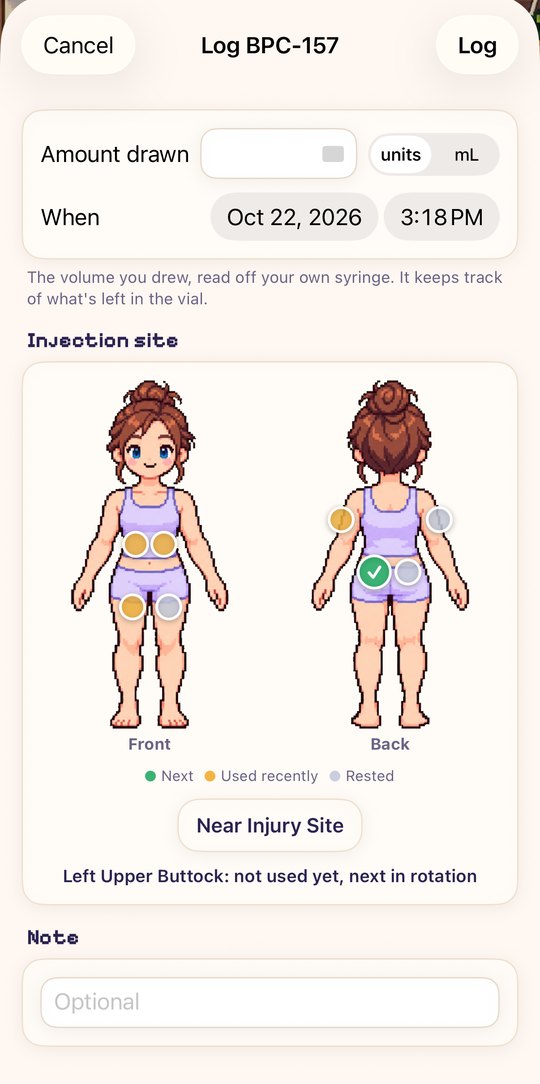
MyPeptideShelf has the same body map built into logging. Tap the site as you log, and it colours each site by how recently you used it and marks the one you've rested longest as next.
Quick answers
How do I use an injection site rotation chart?
Work through the numbered sites in order, recording the date and site each time, so you don't reuse the same spot too soon. Use only the sites that are right for your medication.
Why is the front view mirrored?
It shows the body as if you're facing someone, so their left side appears on your right. The labels say which side is which.
 MyPeptideShelf
 1234
 5678